
OPPO Clone Phone
Screenshots
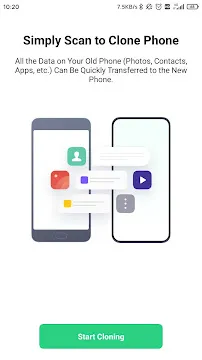
OPPO Clone Phone App For Android provides a safe and efficient way to transfer all your data from an old smartphone to a new device. Many people feel overwhelmed when they upgrade their phones because they fear losing precious memories or important contacts. This official tool simplifies the entire migration process by creating a direct connection between two handsets. You can move your photos, videos, music, and even system settings with just a few taps on the screen.
The application eliminates the need for expensive data cables or slow cloud storage uploads. It uses a private Wi-Fi hotspot to exchange information at high speeds. This means your personal files never travel over the internet, which keeps your data private and secure. Whether you are switching from a different Android brand or an iPhone, this software handles the transition smoothly. The interface remains clean and guides you through every step to ensure nothing gets left behind.
Seamless Migration for All Data Types
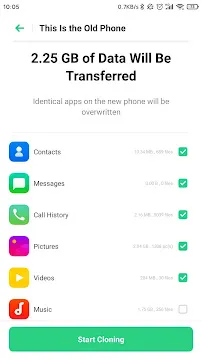
OPPO Clone Phone allows you to migrate an extensive variety of information without any technical hurdles. You can transfer your entire contact list, call logs, and text message history instantly. This ensures that you can continue your conversations on your new device exactly where you left off. The app also moves your calendar events and alarms so your daily schedule stays organized.
Beyond basic text data, the tool manages large multimedia collections with ease. You can send thousands of high-resolution photos and 4K videos in a single session. The software maintains the original folder structure of your gallery during the move. This helps you find your favorite memories on the new phone without searching through a cluttered mess. Your digital life stays intact and organized during the whole journey.
Fast Wireless Connection Without Data Usage
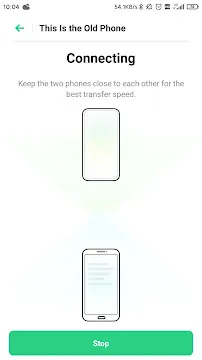
The speed of the transfer remains a major highlight for users who have a lot of storage to move. Because the app creates a local connection between the two phones, it achieves much faster rates than Bluetooth. You do not need to worry about your mobile data plan or a slow home network. The two devices talk to each other directly to ensure a consistent and stable flow of information.
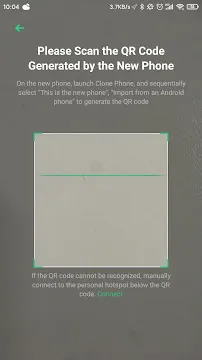
- Connect devices using a simple QR code scan.
- Achieve high-speed transfers without an internet connection.
- Avoid data charges on your mobile service plan.
- Maintain a stable link even for large file batches.
This independence makes the tool a reliable choice regardless of your location. You can set up your new phone at a coffee shop or in a park without needing a Wi-Fi password. The app manages the local hotspot settings automatically to save you from complex configurations. It provides a professional-grade solution that focuses on speed and user convenience.
Move Applications and App Data Easily
Setting up all your favorite applications on a new phone can take hours of manual searching. OPPO Clone Phone solves this by packaging your existing apps and moving them to the new hardware. It identifies compatible software and installs it directly onto the new system. This saves you from the tedious task of downloading each app one by one from the store.
In many cases, the tool can also transfer specific app data and preferences. This means you do not have to log in to every service again or reconfigure your custom settings. You can jump straight into your social media or productivity tools as soon as the transfer finishes. This level of continuity helps you feel comfortable with your new device right away. It reduces the downtime typically associated with switching to a new smartphone.
High Security and Privacy Standards
Security is a top priority for anyone handling sensitive personal information during a migration. The application ensures that your data stays offline throughout the entire process. Since the files do not go to a cloud server, there is no risk of interception by third parties. You maintain total control over your information at every stage of the transfer.
The app uses encrypted protocols to secure the direct link between the two handsets. This prevents other nearby devices from seeing or accessing your data during the move. You can feel confident that your private messages and financial documents remain protected. The software respects your privacy by only accessing the files you choose to migrate. It provides a secure environment for a worry-free hardware upgrade.
Compatibility with Multiple Platforms
While this is an official OPPO tool, it offers broad support for various mobile ecosystems. You can use it to move data from almost any Android brand, including Samsung, Huawei, or Xiaomi. It also includes specialized features for users moving from iOS to Android. This flexibility makes it a go-to choice for anyone joining the OPPO family from a different platform.
- Support for older Android versions back to 4.4.
- Easy migration paths for iPhone users.
- Automatic detection of different file formats.
- Continuous updates to support the latest mobile software.
The app adapts to the different file structures of various manufacturers to ensure compatibility. It translates system settings so they work correctly on the new operating system. This attention to detail prevents common errors like corrupted contacts or missing photos. It offers a universal solution for a diverse global market of smartphone users.
Simple User Interface for Everyone
The design of the software focuses on simplicity and ease of use for people of all ages. You start by selecting the “This is the New Phone” or “This is the Old Phone” option on each device. The new phone displays a unique QR code that the old phone scans to begin the pairing. This visual method eliminates the frustration of typing long passwords or searching for device IDs.
Once connected, you can choose exactly which categories of data you want to send. A clear progress bar shows you how much data has moved and how much time remains. The app provides a summary at the end to confirm that all files arrived safely. It keeps the user informed without using confusing technical jargon. You get a professional experience that makes a complex task feel very simple.
Final Thoughts
OPPO Clone Phone App For Android is a essential utility that takes the stress out of buying a new phone. It provides a fast, secure, and wireless way to keep your digital life together during a hardware change. By moving everything from apps to system settings, it ensures a seamless transition to your new device. The offline nature of the transfer protects your privacy while saving you from mobile data costs. With its simple QR code pairing and wide compatibility, it serves users from all backgrounds and skill levels. You can enjoy your new smartphone immediately without the fear of losing your important files or memories. It remains a reliable and efficient tool that simplifies your mobile experience every single day.